
TekiSchool · HR, attendance and payroll for schools
HR, attendance and payroll, built for how schools really work.
Your school's policies, applied automatically, from the first clock-in to the final payslip. Every deduction explained. Every change audited.
- Built for Egyptian schools
- Payroll in EGP with insurance and tax
- Web admin + mobile app
See a deduction explained
Live from the policy enginePick what happened. Watch your school's policy work it out.
- 1Excuse hoursNo approved excuse for today, so nothing is offset.
- 2Late policy: 30 min allowed55 min late minus 30 min allowed = 25 min over.
- 3Blocks of 30 min, 0.25 day each25 min rounds up to 1 block = 0.25 day.
- 4Payroll12,000 ÷ 30 = 400 EGP a day × 0.25 = 100 EGP.
The employee sees the same result and the reason in the app.
- attendance policy types
- 8
- access levels, down to each field
- 5
- ready reports, Excel and PDF
- 13
- record per employee, joining to payslip
- 1
Why TekiSchool
Generic HR tools were not built for schools
Schools run on terms, timetables and written policies. TekiSchool understands them out of the box, so HR stops fixing spreadsheets at month end.
Terms, holidays and exam periods
Build the year once. Holidays, training days and exam periods flow into attendance automatically, and roll over to next year.
Teachers and admin earn leave differently
Admin staff get annual leave. Teachers get term vacation, like 3 days a term and 6 a year. TekiSchool handles both.
Block leave when it matters most
Close leave requests during exams with your own message. HR can still add leave when there is a real need.
Teacher + HOD, Teacher + Coordinator
One person, several roles, each with its own allowance, hours and approval authority.
Part-time teachers and split shifts
Fixed, flexible, per-weekday and split shifts, plus Ramadan hours with their own dates.
Deductions follow your written policy
Set rules for the school, a department, a group or one person. The most specific rule wins, and the reason is always shown.
One connected flow
From the first day to the final payslip, in one system
Attendance
Clock-ins from the app become a clear attendance day with status, hours, tags and deductions, all calculated from your policy.
- Geofenced clock-in from the phone
- Late, early leave, absence, missing punch
- Excuse hours applied before deductions
- Corrections with a reason and undo
The TekiSchool app
Every teacher clocks in from their phone. Every manager approves on the go.
One app with two modes. Staff see their day, their deductions and their balances. Managers see their team and clear requests in seconds.
Employee mode
- Clock in inside the school geofence
- Every deduction with its reason
- Leave, excuse and correction requests
- Live balances and payslips
Manager mode
- Approve or return requests
- Team attendance at a glance
- Fix a team member's day with a reason
- Reminders for anything waiting
One phone per employee, reset only by IT. Server time and location checks stop buddy punching.
Product tour
The admin tool your HR and finance teams will actually enjoy
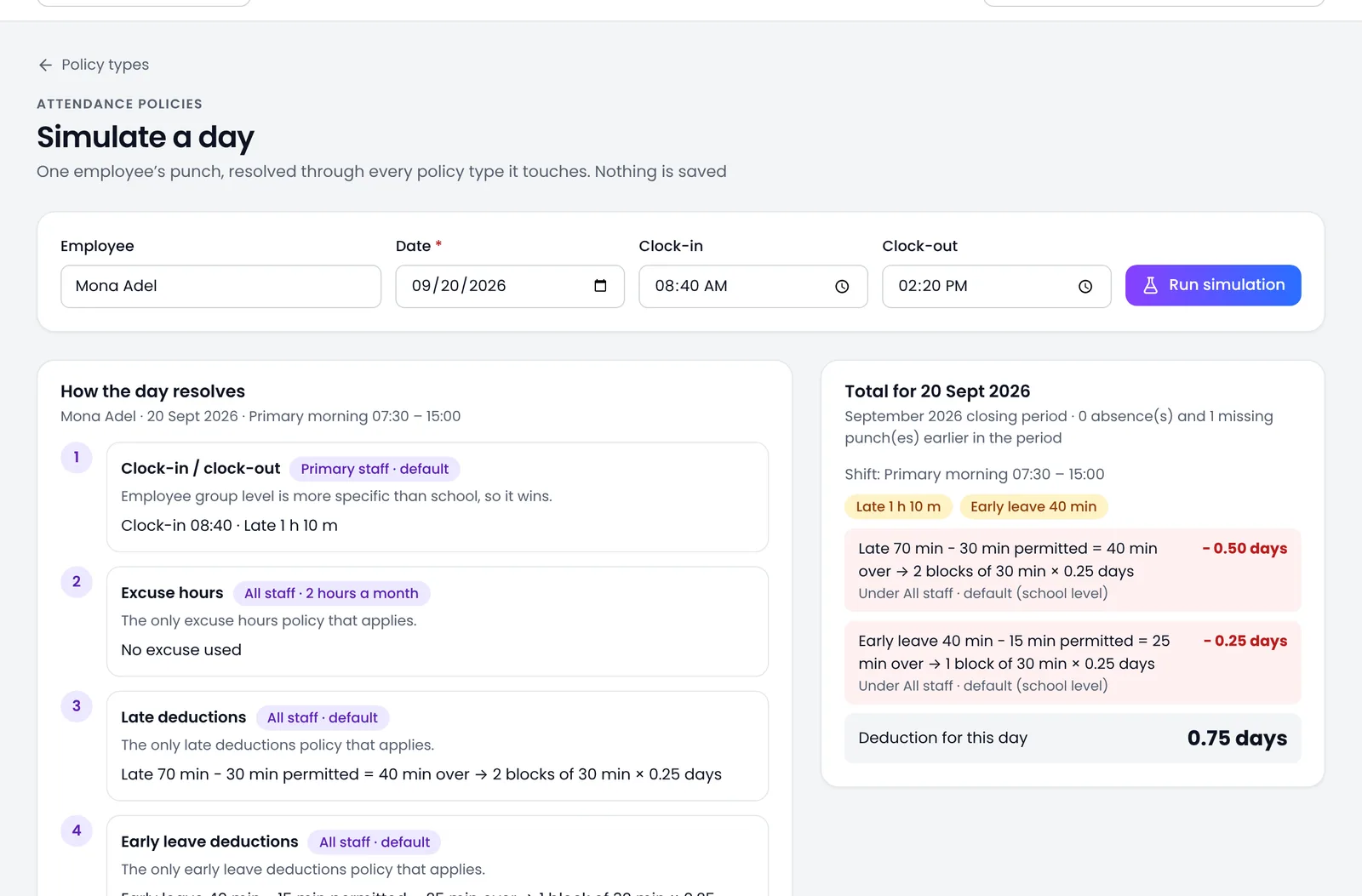
Policy simulator
Test any day for any employee and see every rule that applied, step by step. Perfect for answering “why was I deducted?”
- Every policy type resolved in order
- Shows which rule won and why
- Nothing is saved, so test freely
Month end, without the chaos
From open issues to bank file in five clear steps
Close attendance
Resolve, excuse or waive every open issue, with a reason. Then lock the period.
Review inputs
Overtime, requests, loans and penalties checked before anything is calculated.
Calculate
Salaries, allowances, deductions, insurance and tax for every employee in seconds.
Finance approves
A different person approves. Nobody can calculate and approve their own payroll.
Lock and pay
Payslips go to the app, the bank file is ready, and the month can never change again.
Trust and control
Salary data stays private. Every change leaves a trail.
Owners and finance teams can trust the numbers, because the system refuses changes that do not follow the rules.
Field-level privacy
Salaries and deductions are hidden from anyone who should not see them, in screens, exports and reports.
A reason for every change
Sensitive edits need a written reason, saved with who did it and when.
An audit trail nobody can edit
The database itself blocks changing or deleting audit history.
Locked months
Closed attendance and paid months never change. Corrections become visible adjustments.
One school or a group
Run several schools and divisions (American, British, National) from one account, with staff shared between them.
Every campus on the map
Draw each branch's geofence and gates. Staff can only clock in where they really are.
Move from Excel in a day
Upload your staff sheet. Every row is checked and explained before anything is saved.
Questions schools ask
Can each school or department have its own rules?
Yes. Policies can be set for the whole school, a department, an employee group or one person. The most specific one wins, and the system shows why.
Does payroll handle Egyptian insurance and tax?
Yes. Payroll runs in EGP on a 30-day month and calculates social insurance and income tax, along with allowances, overtime, loans and deductions.
How do teachers clock in?
From the TekiSchool app on their own phone, inside the campus geofence. Each employee's phone is registered, and only IT can reset it.
We use Excel today. How do we move?
Download our template, fill it in and upload it. Every row is checked and explained before anything is saved.
Who can see salaries?
Only the roles you allow. Salary and deduction fields are hidden from everyone else, including in exports and reports.
Where is our data kept?
On Microsoft Azure, with nightly backups. Every change is recorded in an audit trail that cannot be edited.
See TekiSchool with your own school's rules
Book a 30-minute demo. Bring your attendance policy and we will show you exactly how TekiSchool applies it. Pricing is tailored to your school.
- Your policies set up in the demo
- Help moving your staff data from Excel
- A quote based on your staff size